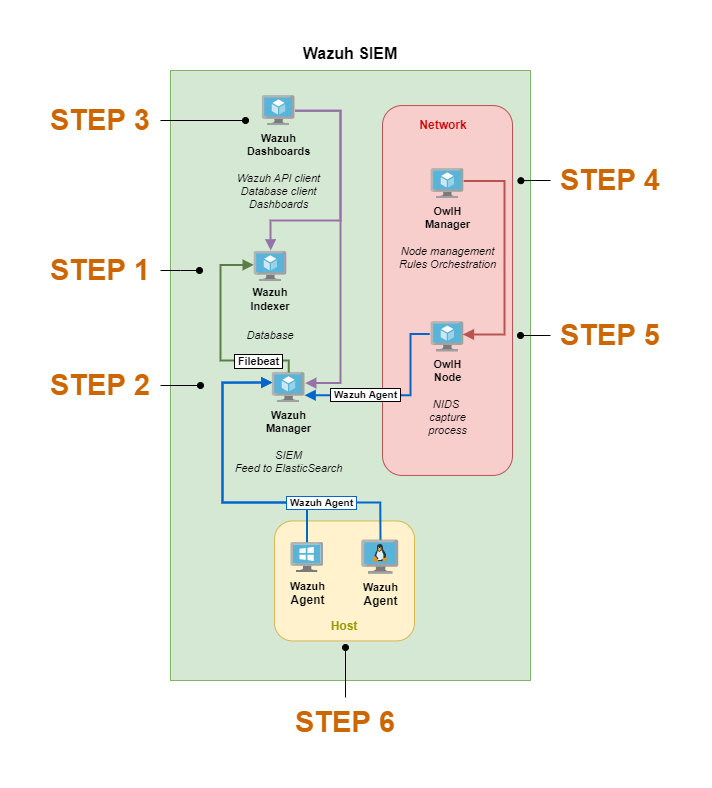
Test on Isolated 2
-
I have allowed all ingress and egress traffic on this network at the moment
-
Step1 - Download the ubuntu 24.04 LXC template in proxmox
-
Step2 - Create the container with the hand written notes configuration
-
Step 3- Run the installation script
apt update
apt install curl
curl -sO https://packages.wazuh.com/4.10/wazuh-install.sh && sudo bash ./wazuh-install.sh -a
   User: admin
    Password: uVa+x.sm5An4XjcD6.?4RhMJAEjBrebG
sed -i "s/^deb /#deb /" /etc/apt/sources.list.d/wazuh.list
apt update
-
Step 4 : Static Mapping of ip address in pfsense
-
Services> DHCP Server > ISOLATED_2 > Add Static Mapping > Fill in the details.
-
Step 5 : Allow WAN subnets to address 192.168.9.101 (Change this later on when you understand it better)
-
Step 6 : Add static routes on kali linux Pfsense Setup
-
Step 7: visit wazuh management portal on 443
Prevent Unplanned Upgrades
apt-mark hold wazuh-manager
Rotate Wazuh Manager Logs to Save Disk Space
nano /var/ossec/etc/ossec.confBash
Add the line <rotate_interval>1d</rotate_interval> to the <global> section as shown below:
<ossec_config>
  <global>
    <rotate_interval>1d</rotate_interval>
Bash
Press CTRL + X, then y, then Enter to save your changes. Restart the Wazuh manager: systemctl restart wazuh-manager.
Delete Stale Logs to Save Disk Space
Since this is a lab environment, I’m not too worried about log retention or shipping them off to cold storage. I’m just going to create a cron job to delete logs older than 30 days.
crontab -eBash
Run this command as the root user to edit the crontab
If prompted to choose an editor, choose nano or vim, whichever suits your comfort level; nano being more beginner-friendly.
# Run every day at 0400
# Find directories older than 30 days and recursively delete
0 4 * * * find /var/ossec/logs/alerts -type d -mtime +30 -exec rm -rf {} \; > /dev/null 2>&1
0 4 * * * find /var/ossec/logs/archives -type d -mtime +30 -exec rm -rf {} \; > /dev/null 2>&1
Plain text
Add these cron jobs below any existing ones
When finished — assuming you’re using nano — press CTRL + x and then y to save and exit the crontab.